
Disney+ runs as a built-in app on any Vizio SmartCast TV made in 2016 or later. You don’t need a streaming stick, a workaround, or a download. Open the app, sign in, and you’re watching within a minute.
That wasn’t always the case. When Disney+ launched in November 2019, Vizio owners had to cast from a phone or use AirPlay just to get it on screen. Vizio rolled out a native app in March 2020, and it’s been part of SmartCast ever since.
Here’s exactly how to find it, install it, fix it when it won’t show up, and what to do if your Vizio TV is too old to run it at all.
Is Your Vizio TV Compatible With Disney+?
Compatibility comes down to which software your TV runs, not just the Vizio name on the box.
SmartCast TVs (2016 and newer) — fully supported
If your TV was made in 2016 or later and runs SmartCast with built-in apps, Disney+ is already on it. You don’t pull it from a separate app store — Vizio pushes new apps straight to the home screen once your TV checks in online. If you’ve added or removed apps before, the process works the same way here (adding apps on a Vizio Smart TV covers the general steps).
Older VIA or VIA Plus TVs (2009–2017) — not supported
TVs running the original VIA or VIA Plus platform, common on Vizio models sold between 2009 and 2017, can’t run Disney+ natively. These older systems shipped with a fixed, locked app list, and Vizio stopped adding new apps to them years ago. If this is your TV, skip ahead to the workaround section below.
Not sure which platform your TV uses? Your model number usually tells you. Plug it in and check with a TV model number decoder if the settings menu doesn’t make it obvious.
A note on locked-down budget models: a few lower-cost Vizio sets — certain D-Series and entry M-Series models bought secondhand — look like SmartCast TVs but ship with a vendor-restricted app set that firmware updates won’t expand. If Disney+ never appears no matter how many updates you install, this is likely why, and a streaming device is the only real fix.
How to Install Disney+ on a Vizio SmartCast TV
- Make sure your TV is connected to Wi-Fi. If it isn’t, connect your Vizio TV to the internet first.
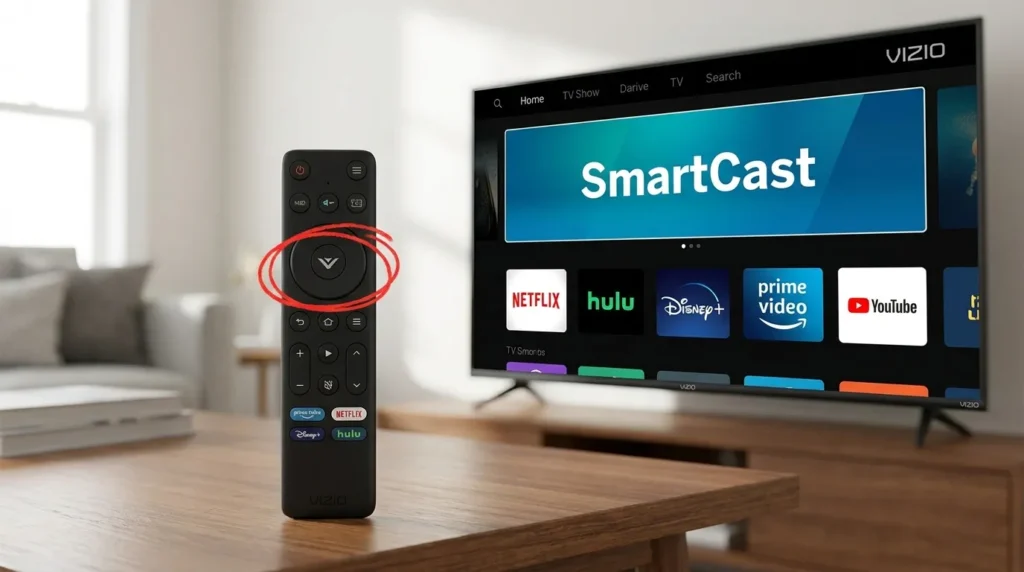
- Press the V button on your remote, or select SmartCast from the input menu.
- Scroll the home screen row until you spot the Disney+ icon — it’s usually grouped with the other major streaming apps near the top.
- Select it and let it load.
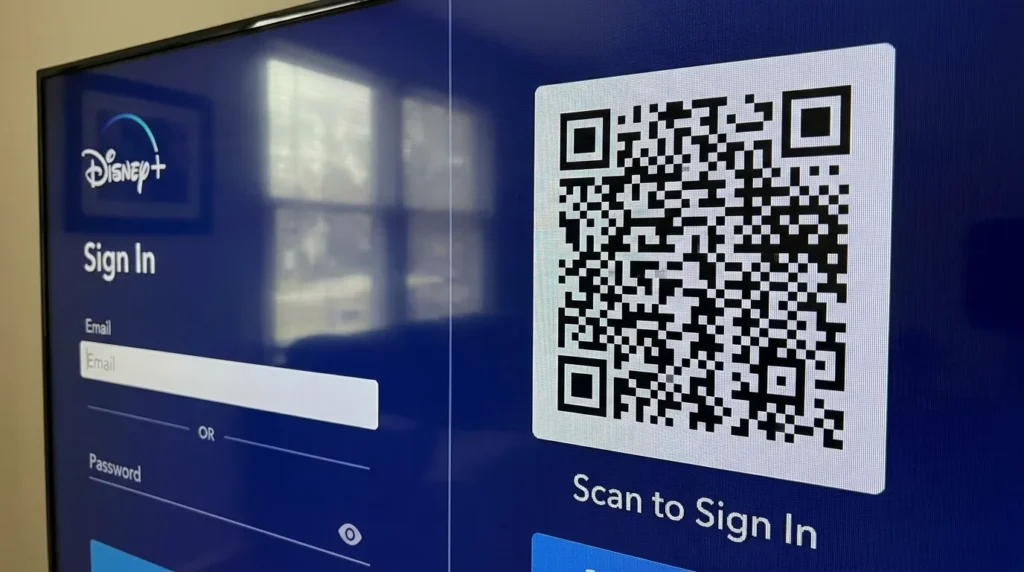
- Sign in with your Disney+ email and password, or scan the on-screen QR code with your phone for a faster login.
- Start streaming.
There’s no download button to hunt for. Vizio’s apps simply appear once the TV is online and current. If you want a printable checklist for getting a new TV fully set up — Wi-Fi, apps, accounts, all of it — a TV setup checklist generator can save you a second trip through the menus.
Disney+ App Missing? Try These Fixes
If Disney+ isn’t on your home screen and your TV is a 2016-or-newer SmartCast model, the app list is probably out of date.
Update your TV’s firmware
Go to Settings > System > Check for Updates and install anything available. Vizio rolls out new and updated apps through firmware, so a TV running old software won’t show apps that launched after its last update. A full walkthrough is here: how to update Vizio TV firmware.
Restart the TV
Unplug it for 30 seconds, then plug it back in. This forces SmartCast to refresh its app list against Vizio’s servers, which fixes more missing-app cases than people expect.
Check your Wi-Fi connection
A weak or dropped connection can stop new apps from loading even right after an update. If your TV keeps losing its network, these Vizio TV Wi-Fi connection fixes cover the usual causes.
Remove and reinstall the app
If Disney+ shows up but won’t open, delete it from the home screen and let SmartCast download it again. Here’s how to uninstall apps on a Vizio TV without losing anything else.
If you picked up the TV secondhand and it’s stuck on a flashing store demo screen, that’s a different issue — and it blocks every app, not just Disney+. Getting a Vizio TV out of demo mode walks through the fix.
How to Watch Disney+ on an Older or Unsupported Vizio TV
If your Vizio TV runs VIA or VIA Plus, you’ve got three workable options.
Cast from your phone
Many SmartCast and even some VIA Plus TVs have Chromecast built in. Open Disney+ on your phone, tap the Cast icon, and pick your TV from the list.
Use AirPlay 2 (iPhone or Mac only)
Newer Vizio TVs support AirPlay 2. Open Disney+ on your iPhone or Mac, start playing something, then tap the AirPlay icon and select your TV. Check whether your exact model made the cut on this list of AirPlay 2-supported TVs.
Buy a streaming device
This is the most reliable fix for a TV that’s locked out of new apps entirely. A small streaming stick plugs into any HDMI port and runs Disney+ on its own software, completely independent of your TV’s built-in limitations. One option worth considering is a Fire TV Stick 4K, which handles Disney+ in full 4K and costs less than four months of Disney+ Premium. If you’d rather compare it against other channel lineups first, this Roku channel list is a good place to see what else you’d be getting alongside it.
Signing In to Disney+ on Your Vizio TV
Open the app and you’ll get two ways to sign in: type your email and password using the remote, or scan a QR code with your phone and log in through your mobile browser instead. The QR option is faster if your remote doesn’t have a full keyboard — and most Vizio remotes don’t. If you’re not sure what every button on your remote actually does, this remote control button explainer breaks it down.
Once you’re signed in, your profiles, watchlist, and downloads sync automatically. There’s no extra setup step after that.
What Disney+ Costs in 2026
Disney+ runs $11.99 a month for the ad-supported Basic plan or $18.99 a month for ad-free Premium with 4K and Dolby Atmos. Bundling with Hulu brings the ad-supported combo down to $12.99 a month. Prices and bundle terms shift fairly often, so it’s worth a quick check before you commit — a streaming cost tracker can help you see whether a bundle actually saves you money compared to what you’re already paying elsewhere.
FAQ
Does Disney+ work on all Vizio TVs? No. Only SmartCast TVs from 2016 onward support the native app. Older VIA and VIA Plus models need casting, AirPlay 2, or a streaming device instead.
Why isn’t Disney+ showing up on my Vizio TV? The most common cause is outdated firmware. Check for updates under Settings > System, then restart the TV.
Can I cast Disney+ to a Vizio TV that doesn’t have the app? Yes, if the TV has Chromecast or AirPlay 2 built in. Open Disney+ on your phone and cast or AirPlay it over.
Is the Disney+ app itself free to download on Vizio? Yes. The app is free to add — you just need an active Disney+ subscription to sign in and watch.
Does the Disney+ app on Vizio work in Canada too? Yes. Vizio’s native Disney+ app is available on SmartCast TVs sold in the US, Canada, and Puerto Rico.